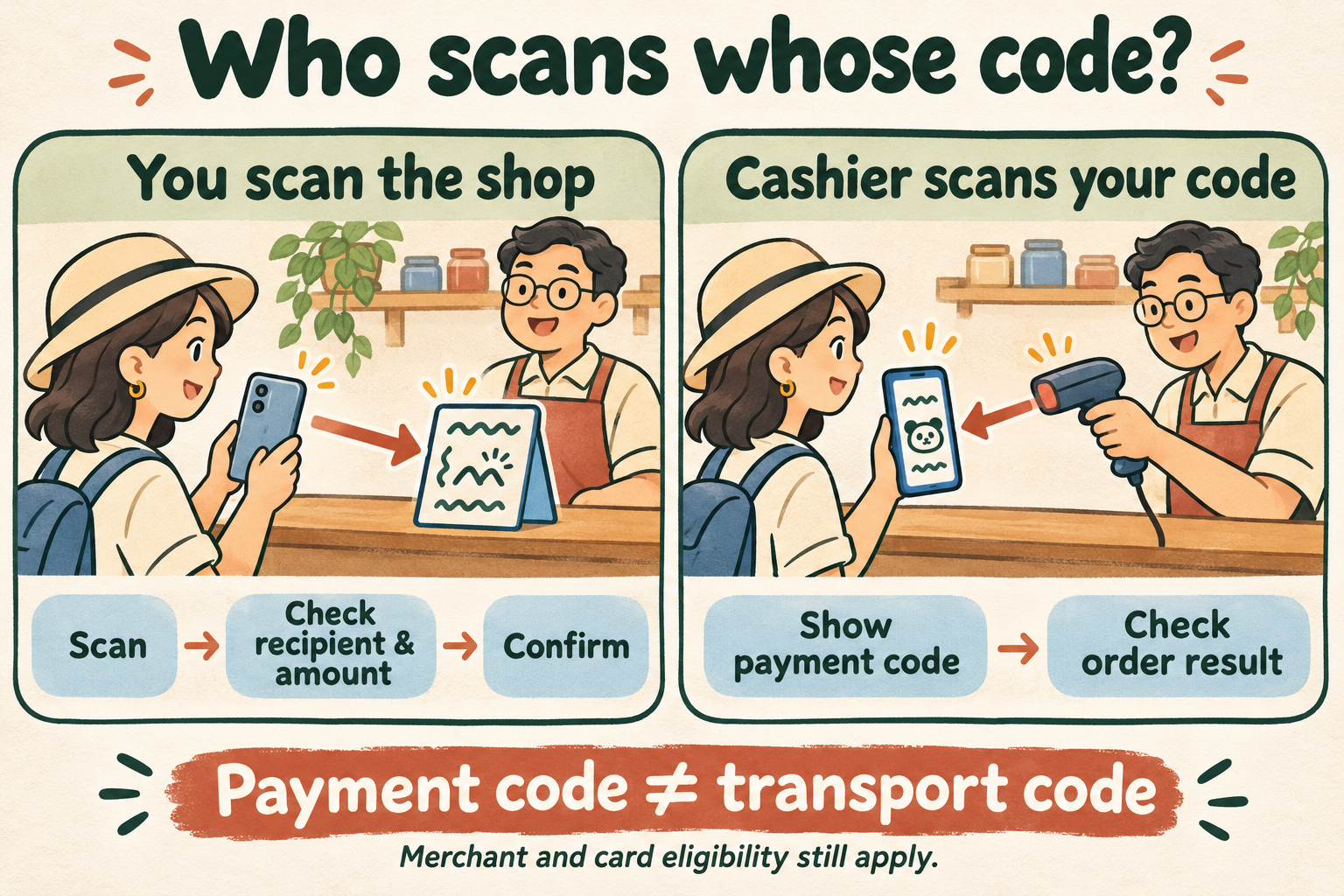
At a checkout, the first question is simple: are you scanning the merchant's code, or is the cashier scanning yours? Both appear in official visitor guidance. The important checks come around that action: the recipient, amount, funding source, any charge and the final payment result. This walkthrough uses generic descriptions because screen labels vary.
Before you start
- An accessible Alipay account with the checks required for the intended payment completed.
- An eligible card you own, with access to issuer authentication if requested.
- The final amount agreed with the merchant and an understood currency.
- A usable connection and another way to settle the bill if this route fails.
Step by step
- 01
Ask which direction the cashier expects
Look for the merchant's payment sign or ask whether to scan its code or show yours. Every printed QR on a table is not a request for money: it may open a menu, booking page or promotion. Start with the intended checkout process rather than trying unrelated code functions.
CHECK BEFORE CONTINUINGYou and the cashier agree who is scanning whose code.
- 02
If you scan, inspect the resulting screen
Open Scan and read the merchant-presented payment code. Check the recipient and currency. Enter the agreed amount only when required. If a merchant mini-program opens instead, complete its order flow and find the actual checkout rather than assuming that scanning paid the bill.
CHECK BEFORE CONTINUINGThe intended merchant order or payment request shows the right amount.
- 03
If the cashier scans, display your payment code
Open the payment-code function, whose label can vary by version. Check the funding source and show the live code to the cashier for this purchase. Keep it private from unrelated people. The scanner reading a code is a transaction step, not your final receipt.
CHECK BEFORE CONTINUINGThe cashier has scanned the intended payment function for this bill.
- 04
Review funding and any authorization
Check the chosen card, fee and any verification prompt. Approve only the purchase you understand. If the card is unavailable for this merchant, a request to add another card does not by itself prove the original card disappeared from your account.
CHECK BEFORE CONTINUINGYou authorized the correct purchase or recognized a failure before proceeding.
- 05
Check the order result with the merchant
Read the transaction status and confirm that the cashier considers the bill paid. If unclear, inspect the original order before starting another payment. Save its reference for follow-up; a bank notification alone does not resolve a disagreement between a pending authorization and the merchant's record.
CHECK BEFORE CONTINUINGThe order and merchant records agree, or you have paused to resolve the discrepancy.
If it does not work
Scanning opens a Chinese menu
Identify ordering and checkout as separate stages. Use available translation to understand items and total, and ask staff if unclear.
Another way forward: Ask for staff-assisted ordering or another supported method instead of approving an unexplained amount.
My card is unavailable or I am asked to add a card
Inspect this order's funding choices and ask whether it supports linked international cards. Check for a separate identity or issuer message.
Another way forward: Use a method the merchant accepts; this message does not identify one universal cause.
The cashier says unpaid but my bank sent a message
Check the original wallet order and ask the merchant to check its record before paying again. Save the reference, amount and time.
Another way forward: Agree on the next step with the merchant and distinguish authorization, completed charge and refund.
Words that help
Show the Chinese text when speaking is difficult. Copying happens on your device.
我扫您的码,还是您扫我的码?
Should I scan your code, or will you scan mine?
一共多少钱?
How much is the total?
请帮我确认这笔付款是否成功。
Please help me check whether this payment went through.
The two directions, in plain language
In a merchant-presented flow, the shop displays its collection code and your phone reads it. You may need to enter the amount. In a customer-presented flow, your app displays its payment code and the cashier reads it. Shanghai's official instructions describe both. Read the visitor guidance.
Ask a short question when uncertain. Correcting the direction is easier than interpreting an unfamiliar screen while other customers wait. Use translation to clarify the instruction, then return to the genuine wallet to inspect and authorize the actual purchase.
Similar-looking codes can do different jobs
A menu QR can open an ordering service without charging anything. A merchant collection code begins a payment request. Your payment code comes from the wallet's payment function. A transport travel code connects to a particular transit service. Their square appearance does not make them substitutes.
A personal-transfer flow is another distinction. Ant's consumer FAQ excludes person-to-person transfers and red packets from the international-card route it describes. If a scan opens a transfer or an unsupported funding message, ask for a supported checkout option. Do not treat it as a reason to alter your identity or account region.
Read the fee for this transaction
Separate the shop's bill, wallet service fee and issuer or foreign-exchange costs. American Express's undated Corporate Card guide describes a 3% Alipay handling charge on international-card transactions above CNY200. That is a published issuer example, not a promise about every account's current offer. Check its scope and fee wording.
Use the fee line and applicable terms for the transaction in front of you. A statement about no additional Alipay+ fee for a supported home wallet belongs to a separate product route; it does not establish the cost of a card linked directly to Alipay. Check your bank's charges separately.
Why another shop can behave differently
A linked card is not a universal merchant credential. Merchant configuration, order type, account checks and issuer authorization affect available funding choices. A successful convenience-store payment does not establish that a deposit, transfer or another mini-program supports the same card.
If the merchant cannot use your chosen route, ask about an accepted physical card, cash or another prepared wallet. Switching wallets while keeping the same underlying card may leave an issuer problem unchanged. A backup should help you finish an intended purchase through a genuinely supported method.
Keep a record that can be investigated
For a disputed result, write down the merchant, amount, approximate time and wallet transaction reference. Check whether the record says completed, pending, cancelled or refunded. These are different states. Give support the relevant reference through its official channel, rather than publicly posting a screenshot containing payment codes or full account details.
If staff ask you to try again, explain what your own order currently shows. You may need the merchant, platform and issuing bank to reconcile different records. A clear account of one order is more useful than several unexplained retries. No fixed reconciliation time or refund arrival date is promised here.
Common questions
Does opening Scan automatically pay?
No. It reads a code and may open a menu, order or payment request. Understand the resulting flow and inspect the final status before assuming the bill is settled.
Can my payment code open a metro gate?
Do not assume so. Transit can require a separate travel code, ticket or supported card. Check the city and operator's current instructions.
Is every failed scan a personal-code problem?
No. Merchant support, transaction type, selected funding, account status, issuer and connection are separate possibilities. Investigate the exact nonsensitive message.
Can I screenshot the payment code for later?
Use the live payment function for the intended purchase and protect it from others. This guide does not establish that an old screenshot is valid, secure or accepted.
Sources & checking notes
- Shanghai government: Mobile payment methods and steps
- Ant International: Alipay and Alipay+ product scope
- American Express: Alipay Corporate Card guide and fee example
- Alipay: Refund states and original funding channels
Sources checked on 6 November 2026. Workflows, routes and troubleshooting suggestions are editorial guidance. Fees, eligibility, reservations and local services can change; follow the official links before relying on a rule.
Original synthesis of public information and editorial planning advice. We have not performed a live account, payment or on-site test of every workflow. This guide does not claim a firsthand visit or professional accreditation.